How to Sell Wholesale on Shopify (2026)
Selling wholesale on Shopify has never been more accessible. Whether you’re a DTC brand looking to expand into B2B or a distributor building your online presence, Shopify now supports wholesale selling on every plan. This guide walks you through the entire process, from strategy to execution.
What Does “Selling Wholesale” on Shopify Actually Mean?
Wholesale selling means offering products at discounted prices to specific buyers, typically retailers, resellers, or business customers who purchase in bulk. On Shopify, this can take several forms:
- Fixed wholesale discounts: a flat percentage off for tagged customer groups
- Volume-based pricing: tiered discounts that increase with quantity
- Request-for-quote (RFQ): letting buyers negotiate custom pricing for large orders
- Catalog-based pricing: assigning specific price lists to B2B companies (Shopify’s native feature)
The right approach depends on your business model, your product margins, and how many wholesale accounts you manage.
Can You Sell Wholesale on Shopify Without Plus?
Yes. As of April 2026, Shopify opened its core B2B features to all plans, including Basic and Grow. This means every Shopify merchant now has access to:
- Company profiles for B2B customers
- Net payment terms (Net 30, Net 60, etc.)
- B2B catalogs with custom pricing (limited to 2 catalogs on non-Plus plans)
- Draft orders and wholesale-specific checkout flows
However, there are limitations on non-Plus plans. You can only create up to 2 catalogs, and advanced features like quantity rules and volume pricing within catalogs require Shopify Plus. That’s where third-party apps like Wezy fill the gap, giving you unlimited wholesale rules, volume pricing, and tag-based segmentation on any Shopify plan.
Step-by-Step: Setting Up Wholesale on Shopify
1. Define Your Wholesale Strategy
Before touching any settings, answer these questions:
- Who are your wholesale buyers? Retailers, distributors, interior designers, corporate clients?
- What discount structure makes sense? A flat 20% off, tiered volume breaks, or custom quotes per order?
- Do you need minimum order requirements? Most wholesalers set a minimum order amount (e.g., $500) or minimum quantity.
- Will you use a separate storefront or the same one? Shopify supports both approaches.
2. Choose Your Pricing Method
Here’s a comparison of the main approaches:
| Method | Best For | Shopify Plan | Tool |
|---|---|---|---|
| Tag-based wholesale discounts | Simple B2B with a few customer groups | Any plan | Wezy Wholesale & Volume B2B |
| Volume pricing tiers | Encouraging larger orders | Any plan | Wezy Wholesale & Volume B2B |
| Request for Quote | High-value or custom orders | Any plan | Wezy Request a Quote |
| Native B2B catalogs | Enterprise with dedicated sales teams | All plans (limited) / Plus (full) | Shopify Admin |
3. Set Up Customer Segmentation
Wholesale pricing only works if you can identify who your wholesale customers are. On Shopify, the most common methods are:
Customer tags: add tags like wholesale, VIP, or B2B directly on customer profiles. This is the simplest approach and works with apps like Wezy.
Logged-in customers: apply discounts to any customer who has an account. Great for membership-style wholesale.
B2B company profiles: Shopify’s native B2B feature lets you create company records with specific payment terms and catalogs. Best for merchants with a dedicated sales process.
For most merchants—especially those not on Shopify Plus—using a dedicated app like Wezy Wholesale & Volume B2B is the most efficient route. It bypasses the 2-catalog limit on lower plans and allows for complex tag-based pricing. (For a broader perspective, you can also check out Shopify’s official wholesale guide).
4. Install and Configure Your Pricing App
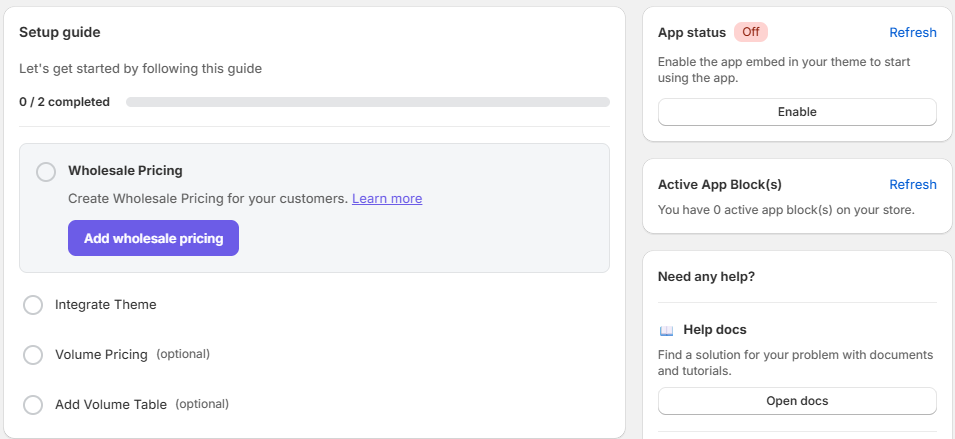
If you’re using Wezy, the setup is straightforward:
- Install the app from the Shopify App Store.
- Go to the dashboard and click Create Rule.
- Set your target audience (e.g., customers tagged with
B2B-Gold).
- Ensure the app is embedded in your theme editor.
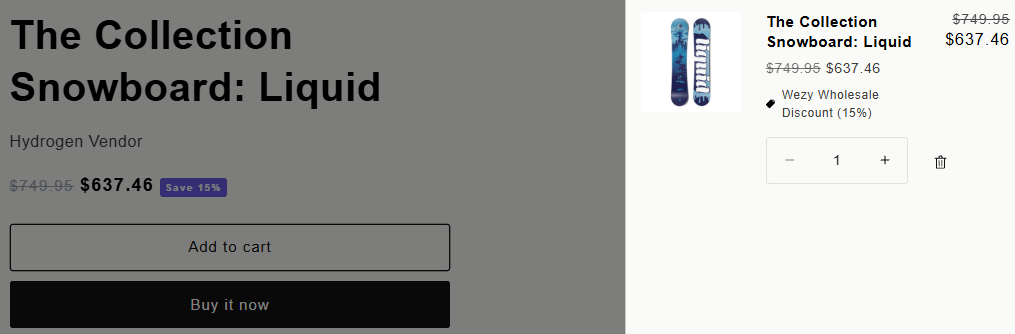
- Test with a tagged or logged-in customer account to verify the discounts apply correctly on the product page and at checkout.
Best Practices for B2B E-commerce
5. Manage Orders and Fulfillment
Wholesale orders often have different fulfillment requirements. Consider setting up:
- Draft orders for manual wholesale orders placed via email or phone
- Payment terms like Net 30 for trusted accounts
- Custom shipping rates or free shipping thresholds for wholesale volumes
- Order tagging to separate B2B orders from DTC in your analytics
How to Attract Wholesale Customers
Setting up pricing is only half the equation. Here’s how to get wholesale buyers to your store:
Create a dedicated wholesale page: add a landing page that explains your wholesale program, minimum requirements, and how to apply. This also helps with SEO for “your brand + wholesale” searches.
Add a “Become a Wholesaler” form: let potential buyers apply for wholesale access. You review applications and tag approved customers.
Attend trade shows and markets: in-person connections still drive the majority of B2B relationships in many industries.
List on wholesale marketplaces: platforms like Faire, Tundra, and Handshake (owned by Shopify) connect brands with retailers.
Leverage your existing DTC brand: if you already sell direct-to-consumer, your retail buyers are often your best wholesale prospects. Add a subtle “Wholesale inquiries” link in your footer.
Common Mistakes to Avoid
Setting discounts too high: wholesale margins are thinner. A 50% wholesale discount might sound generous, but make sure your COGS still leave room for profit after shipping and returns.
No minimum order policy: without minimums, you’ll spend as much time fulfilling a $50 wholesale order as a $5,000 one. Set clear minimums from day one.
Using the same product pages for B2B and DTC: if wholesale buyers see your retail prices, they know your margins. Consider using customer-tag-gated pricing that only shows wholesale prices to logged-in B2B accounts.
Ignoring payment terms: B2B buyers expect Net 30 or Net 60 payment terms. Requiring immediate payment at checkout will lose you accounts. Shopify now supports net terms on all plans.
Frequently Asked Questions
How much discount should I offer for wholesale?
Industry standard is between 30% and 50% off retail price, depending on your margins and the volume commitment. Start conservative (e.g., 20-30%) and adjust based on order volume and customer feedback.
Can I run wholesale and DTC on the same Shopify store?
Yes. This is actually the most common setup. Use customer tags or login-based targeting to show different prices to different buyers on the same storefront. Your retail customers see full prices, while wholesale buyers see their discounted rates.
Do I need Shopify Plus for wholesale?
No. While Shopify Plus offers the most complete native B2B toolkit, you can run a wholesale operation on any Shopify plan using apps like Wezy. The main Plus advantages are unlimited catalogs, quantity rules, and company-specific payment terms.
What’s the difference between wholesale pricing and volume pricing?
Wholesale pricing gives a flat discount to specific customer groups (e.g., 15% off for all B2B customers). Volume pricing offers tiered discounts based on quantity purchased (e.g., buy 10+ units, get 10% off; buy 25+, get 20% off). Many merchants use both together.
What’s Next?
- Set up your first wholesale rule with our 5-minute setup guide
- Learn about Shopify Functions and why they matter for B2B
- Compare native B2B vs apps to find the right stack
- Explore B2B pricing strategies to maximize revenue
- Discover when to use RFQ vs fixed pricing for your B2B model